

Annual Budget Development Process
Executive Overview
The annual budget cycle is a process where the university participates in a shared review of base budgets and develops an operating budget for the upcoming fiscal year for consideration by our Board of Regents. The Office of Budgeting & Financial Analysis (Budget Office) will prepare the budget using a conservative and reasonable scenario for the university’s two largest drivers of revenue: enrollment and appropriations. Our commitment to academic excellence, student success, national research prominence, and being an employer of choice remains steadfast, and we aim to allocate resources strategically to achieve these goals.
This process includes estimating revenues and expenditures for certain fund groups. Fund groups included in budget development are all Educational and General Funds [1*], Designated Funds [2*], and Auxiliary Funds [3*]. Budgets are developed at the detail fund center level for all funds and broken down by the appropriate budgetary commitment items. Furthermore, each fund must present a balanced budget reflecting revenue and expenses at the same amount.
Budget Cycle Process
At the beginning of each fiscal year an original permanent base budget is loaded for all fiscal year funds. Throughout the year, account managers, delegates, divisional budget personnel, and the central budget office maintain permanent budgets via continued analysis and adjustments between line items, departments and divisions. Furthermore, fund managers may request increases to revenue targets which may be allocated permanently if approved. Personnel position control is maintained throughout the year requiring most position types to be permanently funded and balanced at the position level. This continued activity of making permanent changes to the base budget creates the beginning point for the budget development cycle in the spring of each year. During the spring budget development cycle additional changes can be made to accounts to create the new budget for the upcoming fiscal year. This is done in two separate ways. Changes that should not affect the current year budget will be made in an alternate system called the Bex Analyzer (Bex). Permanent changes that are valid in the current year and need to continue into the new year would be processed in SAP and will feed into the Bex Analyzer during nightly uploads. In late June, the nightly uploads are discontinued therefore “freezing” the Bex budget system. The central budget office will then review entries, finalize revenue targets, and operationalize President’s Cabinet strategic allocations to present a final budget to the Board of Regents. Once approved by the Board of Regents, the central budget office then loads the new original permanent base budget for the new fiscal year. This completes the annual budget cycle.
-
Key Dates
Activity Date Deans, Directors and Department Heads Review Budget Changes April 1 – May 1 Vice Presidents Review Budget Changes April 1 – May 8 President’s Cabinet Review Changes May 11 – June 1 Office of Budgeting & Financial Analysis Budget Preparation May 11 – June 22 Finalize Budget Reports June 22 – July 3 President Budget Review and Submission to Board of Regents July 3 – July 8 Board of Regents Approved Final Budget Aug 6 – Aug 7 FY27 Budget Extraction to SAP July 25 – Aug 10 -
FY27 Organizational Changes
The budget office team will continue to implement the organizational changes within and across divisions that have occurred, as well as any changes being implemented for FY27. If information is needed from departments, the budget office in coordination with human resources will reach out to request assistance to implement the approved changes.
-
Account Manager Accountability
Participation in the spring budget development cycle by departmental units varies based on two major factors; (1) level of responsibility; fund center account managers vs. fund managers, and (2) funding sources being managed by the unit. In general fund managers of Student Fee Funds, Auxiliary funds, and departmental Income-Generating Funds will have a higher level of responsibility during the process than fund center level account managers in the Primary Fund Group (PFG).
Primary Fund Group
The primary fund group (PFG) includes the following funds:
100005*
Operations Support
100006*
Space Support
100010*
Texas State Round Rock
100011*
EARDC
100014*
Institutional Enhancement
100055*
Operations Support Round Rock
100066*
Space Support Round Rock
120214*
Texas University Fund [TUF]
200001*
Designated Method
200006*
Designated Method Round Rock
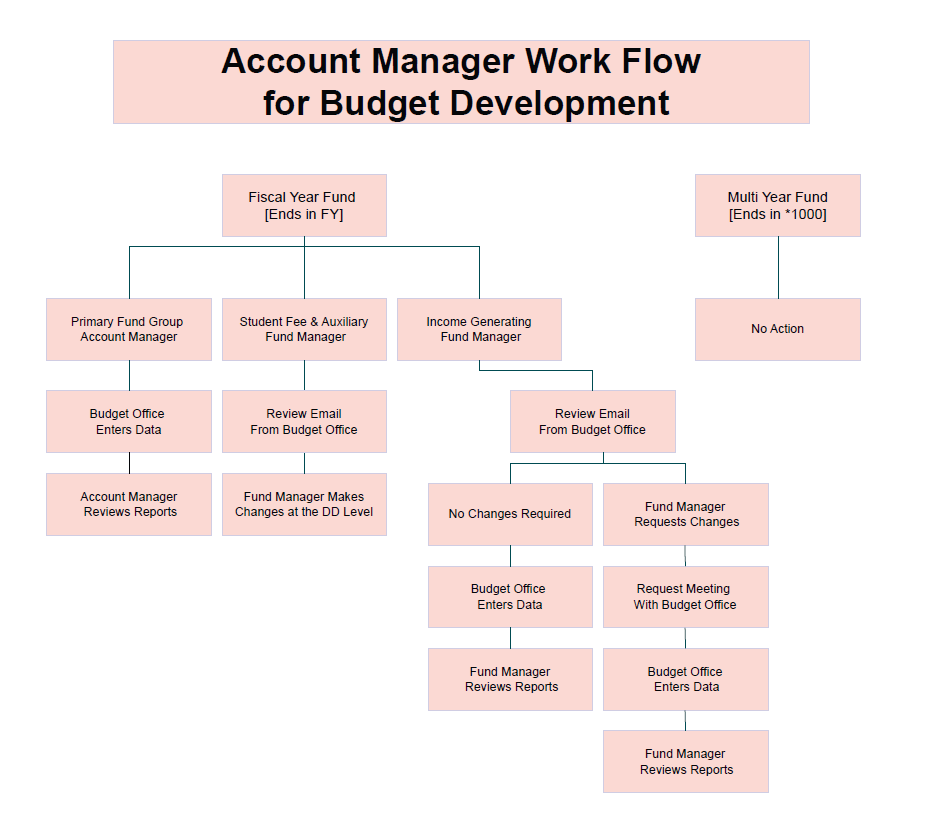
The revenue streams for this fund group are primarily student tuition and state appropriations. These allocations are managed by President's Cabinet and distributed via the process outlined above. Account managers in PFG do not have authority to increase base budgets independently. Any approved increases to base budgets for operating lines during budget development will be input by the divisional level budget representative or the budget office. Permanent salary increases are managed through the salary review process in the summer. Therefore, at the unit level, there are no actions for account managers to take in their PFG funds during the spring budget development process. However, units can review their budgets throughout the cycle using the following instructions.
Each vice president has the authority, based on the strategic initiatives and vision for the division, to make reallocations across departments. The respective vice president will be responsible for communicating any college/departmental-level targets, if applicable, and their divisional-level budget representative will have access to the budget development system to make changes at the VP level.
Additional Funding in PFG:
The Budget Office prepares an analysis of available funds in the PFG above the base budget for President's Cabinet’s consideration. The cabinet is responsible for allocating those funds to meet the university’s strategic initiatives.
For FY27, the university is soliciting new budget requests from the divisions via each vice president. President’s Cabinet will evaluate the submitted requests and recommend funding actions for final approval by the President. Requests may be for new positions, M&O funding increases, and one-time funding needs.
Once the President has approved the available funds allocations, the Budget Office will implement the decisions and enter them into the budget development system.
Student Fee Funds and Auxiliary Funds:
Fund managers for student fee funds and auxiliary funds will continue to have annual meetings with either the central budget office or the AVP for Budget and Planning to review and plan for the upcoming budget cycle. During the planning meetings, revenue targets will be finalized, and the budget office will also provide targets for certain calculated line items like salary review, ULP, state longevity, and utility budgets if applicable. Fund managers or their delegates will have access to make changes in the Bex system and may also reallocate expense budgets within revenue targets across fund centers and budgetary commitment items, as necessary.
Departmental Income Generating Funds
These funds are defined as all income-generating funds not in primary fund group or in the list of student fee funds and auxiliary funds above. Account managers for these funds will receive an informational email from the budget office outlining the changes that will be entered into the budget development system on their behalf. Changes to these funds will include an update to revenue estimates, salary review, ULP, state longevity and utility line items where applicable. Revenue estimates are calculated by the central budget office using a conservative 3–5-year average of previous revenues.
Fund managers are responsible for reviewing this communication and determining if they have significant updates they would like to make other than those outlined in the email. If fund managers have additional changes they wish to discuss, they should request an appointment via email to Budget@txstate.edu. Any changes agreed upon by the fund manager and the budget office will be entered into the system by budget office personnel.
Multi-Year Funds
Multi-Year funds are defined as funds that end in *1000. These funds do not participate in budget development because they do not have any permanent budget. Therefore, there is no budget development activity for fund managers or account managers with budget in a multi-year fund.
-
Account Manager Workflow
For FY 27, as outlined above, we are changing who is required to make updates to their budgets in the budget development system. All account managers will have view access, but only certain fund managers will be required to update their budgets in the system. Below is a flowchart based on account manager showing which type of access the user will have.
-
Bex Analyzer Access
All Funds
Budget Development Reports are available through the Bex Analyzer system throughout the spring budget development cycle. If your account does not have a permanent budget allocated to it, there will be no Budget Development Reports for you to review. All account managers should have access to review budget changes reflecting current planning considerations throughout the process. Certain fund managers, as outlined in the above tab, will also have access to update their budget in the Bex system.
All pertinent process and training documents are located on the Budget Development page.
Budget Development System- Bex Analyzer-Security Access:
Security access to the budget development system is tied to fund centers in SAP. All account managers should have read-only access to the Bex system for their fund centers. Fund managers who are authorized to make changes in the system should have access if they were able to make changes last year. However, any delegates the fund manager may enlist to assist with changes may need to have security set up as well.
- If you or your delegate needs assistance in determinine security access, please contact the Office of Budgeting & Financial Analysis at budget@txstate.edu.
You can access the Bex Analyzer via SAPGUI or online via Remote Apps.
- Anyone who works with a Mac will need to use the remote apps and should contact ITAC.
- If you experience technical problems with the SAP download or installation, please contact the Information Technology Assistance Center (ITAC)by email (itac@txstate.edu), by live chat, or by phone (512.245.4822).
Timelines for Making Changes:
Until June 22nd, live nightly updates from SAP will reflect HR actions and permanent budget changes. Therefore, routine business processes are being reflected in the budget development system up until the June freeze date. HR actions that are for future years only should be coordinated with the Budget Office or Academic Affairs prior to making changes to positions in the budget development system.
Unit-level account managers and fund managers will be able to review reports during the entire spring budget development cycle. For those fund managers with access to make changes, you can only make those changes during the appropriate window indicated in the Key Dates tab above.
-
Glossary of Terms
Below is a list of commonly used terms during budget development
Academic Year A nine-month period within a fiscal year beginning in September and ending in August and containing the academic sessions held during consecutive Fall and Spring terms.
Account Manager An employee at Texas State University who is directly responsible for fiscal management of one or more university accounts, regardless of the source of funds. Fund managers are responsible for the revenue stream of the entire fund, not just a budget allocation.
Appropriations Operating and capital outlay funds provided to Texas State University for a fiscal year as appropriated by the State Legislature and signed by the Governor.
Auxiliary Funds Funds in this group are used to track auxiliary enterprises fiscal activity. An auxiliary enterprise is a self-supporting business activity that furnishes a service to students, faculty, or staff and charges a fee directly related to but not necessarily equal to the cost of the services.
Balanced Budget A budget comprising of a set of funds whose total revenues equal total expenditures.
Base Budget The beginning original permanent budget for a unit, fund, or fund group as posted at the beginning of the fiscal year each September 1st.
Bex Analyzer The SAP application used to capture budget development changes for future fiscal years.
Board of Regents The Texas State University System administration, under the leadership of the Chancellor, provides value-added services to the system's seven member institutions, including academic program planning, legal counsel, financial, audit, contract administration, government relations, and communications services. The administration is organized within seven offices.
Budget A budget represents the estimated revenues and expenditures for a fiscal year for all funds. It also sets the spending authority for account managers who must keep expenditures within their assigned budget.
Budget Adjustment A transactional change made in the SAP system that increases or decreases a base budget and therefore changes the spending authority amount accessible to the account manager.
Budget Allocation A budget allocation is an expense budget allocated to an account manager within a fund. There can be multiple allocations within a fund to a broad range of account managers.
Budget Cycle The activity that encompasses the submission of the biennial Legislative Appropriations Request, the Appropriations Act, the allocations of funds at the University level by the President, and the University Operating Budget. Allocations are determined by the university mission, size, organization, economic factors and Texas law.
Budget Development The annual process for building base budgets for the upcoming fiscal year.
Budget Extraction The process of extracting the final budget from the budget development system and loading it into SAP for the new fiscal year.
Budgetary Commitment Item A budget classification used to identify and monitor funds set aside for a specific type of expense.
Central Budget Office The central budget office is the core administrative body that develops the budget, reviews agency requests, and monitors financial performance.
Change Access [Bex] Security access given to an account manager which allows them to make changes in the budget development system software [Bex]
Delegates Individuals on campus who are not assigned as an account manager in SAP, but who are given access to an account for reporting purposes.
Designated Funds SAP fund group 2*: Unrestricted resources that an institution has set aside for particular uses through internal action, rather than external restriction.
Divisional Budget Personnel Personnel within each division who are given the responsibility to assist with budgeting tasks for their division. These employees may assist with tasks such as reporting, making budget changes, and updating the budget development system.
Educational and General Funds The general activities supported primarily by State Funds to provide services and programs throughout the University, including instructional programs leading to formal degrees, research, and public service.
Encumbrance A financial transaction which reserves funds for a specific purpose.
Enrollment Enrollment is the count of students registered for classes at a college or university during a given period.
Expenditure A financial transaction which records the cost of operations.
Fee Funds A fee fund is a governmental fund used to account for revenues collected from specific fees that are restricted or designated for particular purposes or activities.
Fiscal Year A fiscal year is a 12-month accounting period used for financial reporting and budgeting that does not necessarily align with the calendar year.
Fiscal Year Fund A 10-digit fund number that ends with a fiscal year designation. Example: 2000011026 is a fiscal year fund for FY26. Fiscal year funds receive a new budget allocation annually.
Freeze Budget The process during budget development where the budget development program [Bex Analyzer system] is programmed to stop recording nightly uploads from the live SAP system. This allows for a period of time when budgets can be finalized and balanced as part of preparation for extraction for the new fiscal year.
Fund A self-balancing account with a unique revenue stream, particular limitations and restrictions, its own fund balance, and unique budgeting properties.
Fund Center A 10-digit number that identifies the area within the university in which expenditures occur and the responsible hierarchy.
Fund Group A group of funds which are similar in nature. Example Restricted funds [4*], Auxiliary Funds [3*], Service Centers [2024*]. Or a fund group could be grouped together to provide funding for a particular activity. Example: PFG Fund Group is used to fund the main E&G mission of the university.
Fund Manager An employee at Texas State University who is directly responsible for fiscal management of one or more university accounts, regardless of the source of funds. Fund managers are responsible for the revenue stream of the entire fund, not just a budget allocation.
Funds Available [PFG] The amount of unobligated excess revenues identified during budget development that the President's Cabinet is responsible for allocating in alignment with university strategic initiatives.
General Revenue Funds State funds appropriate to the University and which are used for operating funds.
Income Generating Funds Income-generating funds are self-supporting governmental funds used for activities that recover costs through user fees or service charges, are separate from tax-supported general funds, and operate similarly to business activities.
Multi-Year Fund A 10-digit fund number that ends with *00*. Example: 4560081000 is a multi-year fund. These funds do not get permanent budget, and funding cannot be spent until it is received.
Nightly Upload The process during budget development where a nightly interface loads permanent budget changes and HR actions from the SAP System to the Bex system.
Operating Budget A financial plan that outlines the expected revenues and expenditures for an organization’s day-to-day operations over a specific period (usually a fiscal year).
Operating Lines Comprises of the budgetary commitment items for M&O, Travel, Student Wages, and Capital.
Organizational Changes Organizational change is the planned or unplanned adjustment of how an organization operates, structures itself, or delivers its services. This can include personnel and/or departments moving to another reporting line, as well as a restructuring of budgetary control over some specified expenditure budgets.
Original Budget The beginning permanent budget for a unit, fund, or fund group as posted at the beginning of the fiscal year each September 1st. Original is a document type for a budget adjustment.
Permanent Budget A budget type that indicates the budgeted allocation is permanent and ongoing vs. a temporary one-time funding allocation. Permanent budgets repeat year after year, temporary budgets do not.
Personnel Position Control A budgetary process that requires certain positions to maintain a permanent budget equal to the actual cost of the position regardless of if the position is filled by an employee or vacant.
President's Cabinet The executive leadership team that supports the university president in decision-making and overall management.
Primary Fund Group [PFG] A specific set of funds funded primarily by student tuitions and appropriations used to support the Educational and General function of the institution. PFG funds are managed and allocated by President's Cabinet.
Read Only Access [Bex] Security access given to an account manager which allows them to review entries in the budget development system software [Bex].
Reallocation of Budget The process of moving budget between line items, accounts, departments, or divisions. The reallocation changes the spending authority for both accounts being reallocated.
Revenue Financial transaction which records new funds received by the institution.
Revenue Target The amount of the estimated revenue posted to a fund for a fiscal year. Indicates the amount of revenue that is expected to be collected for that unique fund for the year.
Salary Review The formalized process for quantifying available funds for salary increases annually, determining which employees are eligible, and then allocating funds via a program for loading into the HR data in SAP.
State Longevity Each regular full-time staff employee, excluding law enforcement officers eligible for hazardous duty pay under provisions of state law, is entitled to longevity pay of $20 per month for each two years of service as an employee of the state of Texas up to and including 42 years of service. This pay will begin at the end of the 24th month of lifetime service credit and will increase in $20 increments at the end of each two years thereafter.
Temporary Budget A budget type that indicates the budgeted allocation is a temporary one-time funding allocation vs a permanent and ongoing budget allocation.
Tuition and Fees Tuition and fees are amounts paid by students for instruction (tuition) and for required or optional services and activities (fees).
ULP University Longevity Pay is a 1.5% salary increase every two years for a maximum of 4 increases.
Utilities Budgetary commitments to cover the cost of electric, water, wastewater, and other common utilities on campus.
For a downloadable version of the information on this page, click here.